Lead Scoring in Dynamics 365 Customer Insights: The 5Ws and How to Start
Learn how Lead Scoring works in Dynamics 365 Customer Insights Journeys, when to use it, and how to build practical scoring models that improve lead qualification and sales focus.

Lead Scoring has always been a great unknown to me in Dynamics 365 Customer Insights - Journeys. I’ve known about it since the days of outbound marketing, but I never had the chance to see it implemented in a real customer project or help customers adopt it.
This article gets its inspiration from the session “The chaos of Customer Insights projects - The mistakes we keep making (and pretending we don’t)” by Vivian Voss in ColorCloud 2026. She asked the public if in their projects of Customer Insights Journeys, their clients could define what a lead is. I think only one person raised a hand. Vivian highlighted that one of the biggest bottlenecks is that marketing and sales teams often don’t collaborate closely enough.
This made me think, that it is probably the main cause for people to not even consider the feature lead scoring. But I wanted to explore it further because I believe it can significantly improve conversion rates.
NOTE
TL;DR:
Lead Scoring in Dynamics 365 Customer Insights helps organizations identify which prospects are most likely to convert based on engagement and profile data.
By combining behavioral signals like email clicks, event registrations, and form submissions with demographic information, marketing and sales teams can focus on the leads that matter most.
In this article, we’ll explore:
- what Lead Scoring actually is,
- when it makes sense to use it,
- and how to start building a practical scoring strategy in Customer Insights - Journeys.
What Exactly Is Lead Scoring
Lead Scoring is essentially a prioritization system. It allows you to give a score to a lead based on the data that we collected from the lead.
In order to score the lead you have to give or remove points to interactions or data from the lead. For example:
- Opened email → +2
- Clicked CTA (Call to Action) → +10
- Demo request → +50
- No interaction for 30 days → -20
This helps identify how engaged a lead is with your product or service. This engagement level can change over time (taking our example, if there is no interaction for 30 days, the engagement is not the same as when he clicked the Call to Action) and ultimately can give us an estimated probability of whether the client is prone to buy or not.
Negative scoring is just as important as positive scoring because inactivity or disengagement can indicate reduced buying intent.
Not all actions are equal, and you can adapt this scoring points over time. At least with Dynamics Customer Insights Journeys 😉
Who Is Lead Scoring For
This is an important question because Lead Scoring should be a shared effort between sales and marketing teams. If each team works separately and specially handle leads differently, lead scoring will only be implemented halfway and it won’t reach the purpose. The Marketing team will qualify the lead thanks to lead scoring and the sales team will follow up on the lead. So they need a common definition on when a lead is qualified.
Regarding organizations, I think it makes the most sense in organizations with many leads, if an organization is not having that many leads or even they don’t use leads at all, lead scoring is going to be like buying a big motorbike when you are already struggling riding a bike.
TIP
It is always good to start somewhere, so if this is your case, this is how I would do it:
- Define what a lead is (involve the Sales and Marketing Teams in this decision)
- Define the handling process of a lead (who will be accountable and until when) and the sources of the leads
- Adapt your processes for leads (Marketing Forms, Journeys, Segments)
- Introduce Lead Scoring, test different models and decide what works best for you
Where Does Lead Scoring Make Sense
Lead scoring can help you best when you need to get the overview of the leads and you have very different ways of evaluating them. If you’re already setting up webinar or event campaigns in customer insights journeys, it makes a lot of sense to introduce lead scoring to better assess which leads are more engaged with you alongside their participation of your campaign. Actually, Lead Scoring is most valuable when intent is gradual rather than immediate.
So, for instance, if someone downloading a brochure is not necessarily ready to buy. But if they later attend a webinar and visit pricing pages, intent becomes clearer.
Lead Scoring is also very useful to evaluate leads for the information you already have about them. Taking a look at demographic or firmographic information of the lead, you can better asses if they are easier to qualify or not.
An example of this is if you know that your services have a higher conversion rate with big enterprise companies than Small to Medium Companies, you can score the leads from the big companies higher. Or if your lead is from a CEO, it might score higher than a engineer, as it can make a purchasing decision easier than the engineer.
When Should You Use Lead Scoring
There are situations in a company that beg for Lead Qualifications:
- When marketing is generating more leads than sales can process
- when sales complains about lead quality
- when engagement data already exists
- when customer journeys become complex
On the other hand, Lead Scoring might not be as helpful in early stages, as the system doesn’t have many leads to handle. If you only receive a handful of leads per month, Lead Scoring may create unnecessary complexity to your processes.
Why is Lead Scoring a good idea
I feel like Lead Scoring might be one of the cornerstones of Marketing Automation. The possibility to automate the evaluation of leads in such a level of complexity makes scale in leads handling so much better.
As the prioritization takes over, sales can do a faster follow-up with the leads that are qualified, which ultimately will result in higher conversion rates of the leads. This reduces the manual qualification to the minimum and makes a bridge between the marketing team and the sales team.
Customer Insights Journeys is designed to take all the information you’re collecting from your emails, journeys, events, etc. and allows you to make your scoring models adapted to your clear necessities.
Needless to say it’s a feature included in the Customer Insights Journey license and Microsoft is not going to charge you less if you don’t use it 😁
How to Start
Before building your first scoring model, remember that the goal is not to create a perfect mathematical system. The objective is to help sales teams prioritize conversations more effectively.
Start with a small number of meaningful interactions and refine the model over time based on actual conversion results.
To Setup Lead Scoring Models I followed this Post by Megan V Walker along with the Microsoft Documentation. But in short I’ll put the steps I followed:
- I activated the feature Switch for Lead Scoring
- I created a new Model
- I added conditions to my scoring model set up to add or substract on my conditions
- Published my Scoring Model
- Saw the analytics and the score of my leads
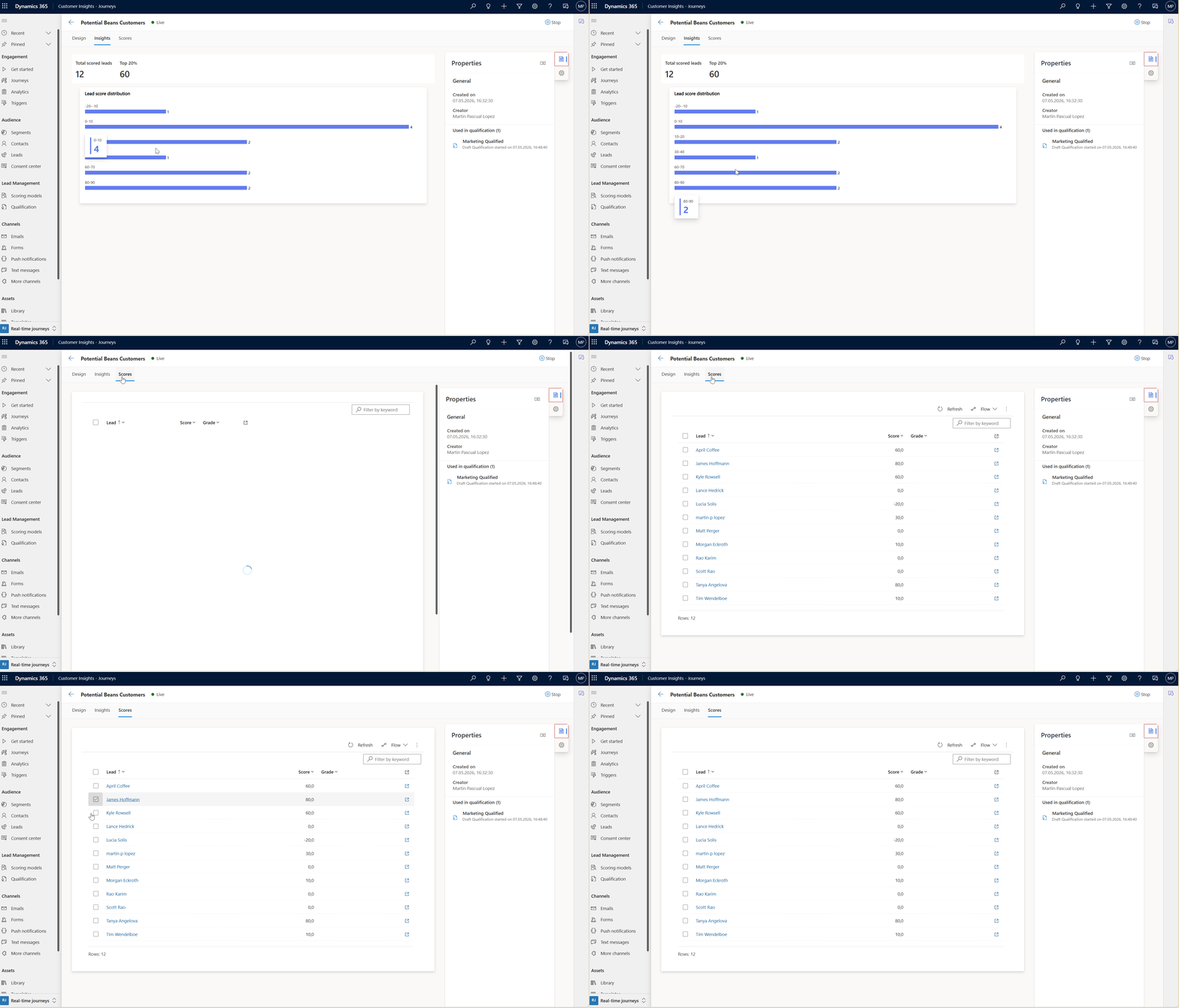
My Simple Lead Scoring Strategy
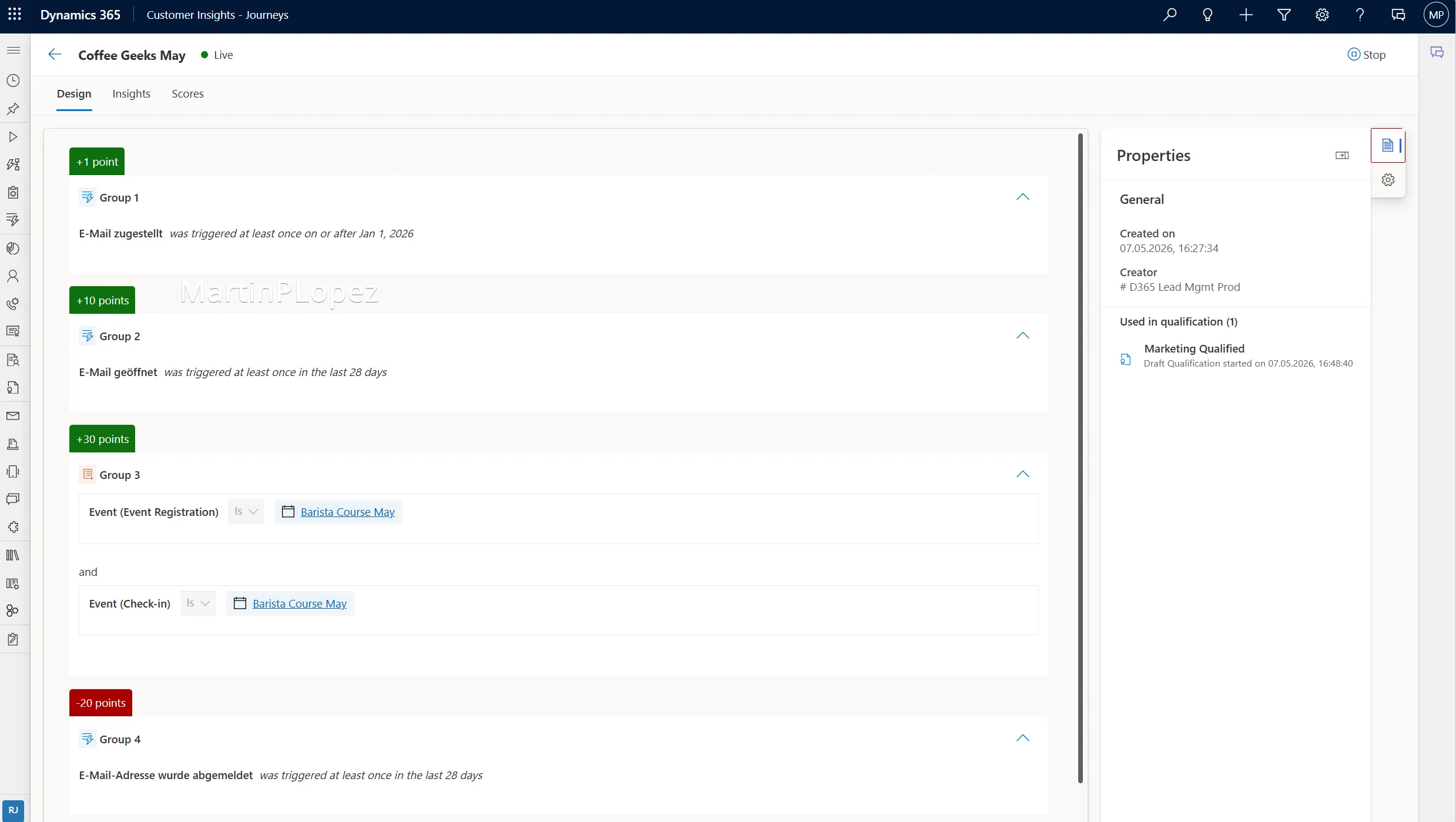
I used a very simple Lead Scoring Strategy. I created a lead scoring to identify the coffee geeks that are more willing to buy coffee beans in May. I setup the following conditions:
| Interaction | Score |
|---|---|
| Email received | +1 |
| Email opened | +10 |
| Barista Course Registered and Checked In | +30 |
| Email opted Out | -10 |
Here an overview of my scoring model:
After implementing the scoring model you can also automate the conversion into marketing qualified leads (MQL) combining the models (or not) and giving it a threshold to which they’re ready to be worked on by Sales:
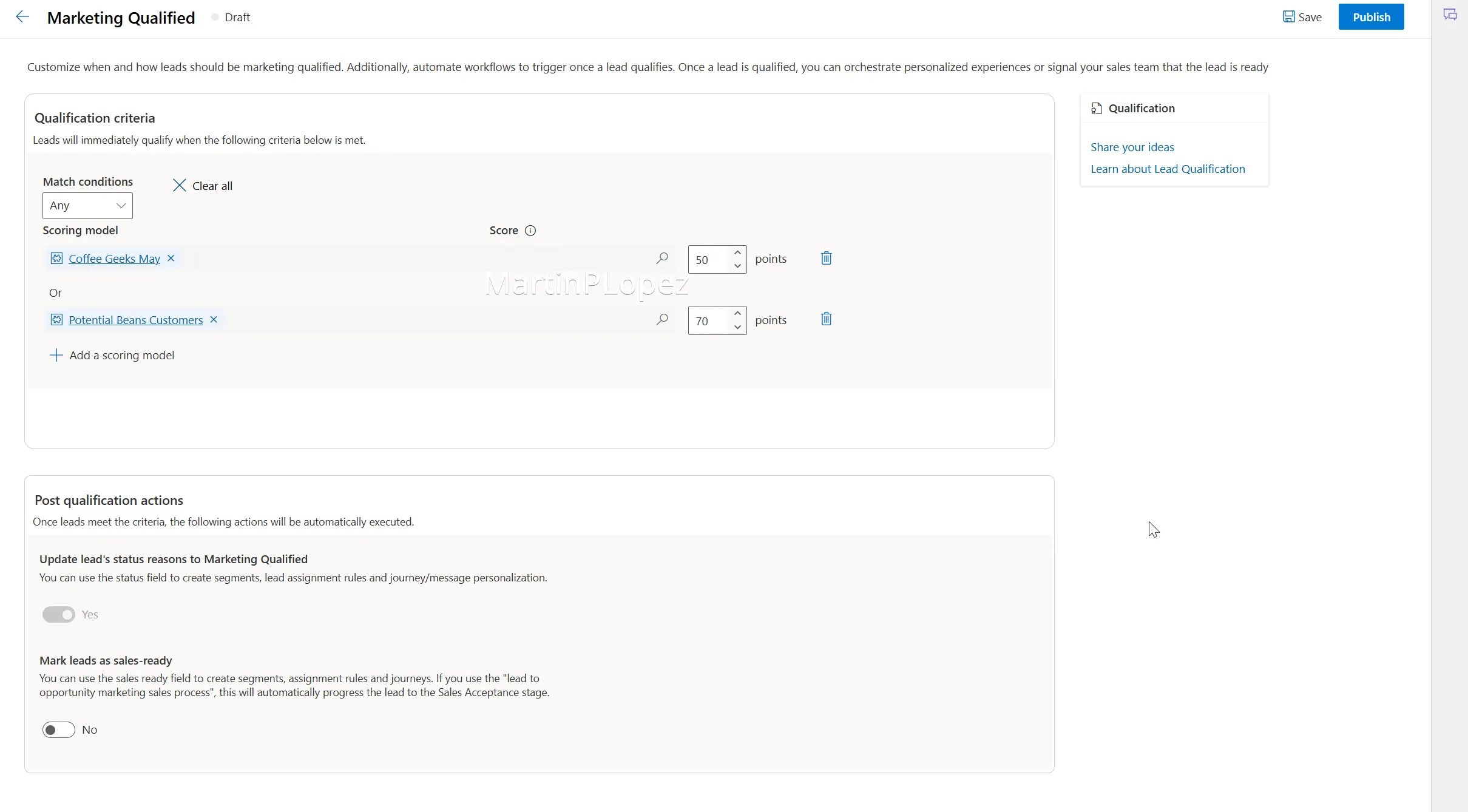
Different models can have different thresholds to qualify, and models can become obsolete after a campaign or event. There’s always the possibility to stop the qualification model and modify it to fit best your new models.
Conclusion
Lead Scoring is not about building the most complex scoring model possible. It’s about helping marketing and sales teams focus on the leads that actually matter.
The best scoring models are usually not the ones with dozens of conditions and perfectly calculated formulas. They are the ones teams understand, trust, and consistently use in their daily processes.
If you’re starting with Lead Scoring in Dynamics 365 Customer Insights - Journeys, keep it simple:
- define what a qualified lead means,
- align marketing and sales around that definition,
- start with a few meaningful interactions,
- refine the model over time using real data.
A scoring model should evolve together with your campaigns, your customer behavior, and your business goals.
Customer Insights - Journeys already provides the tools to make this possible. The real challenge is not the technology itself, it’s creating a shared understanding of what buying intent actually looks like in your organization.
And honestly, that conversation alone may already improve your marketing process more than the scoring model itself.
One useful CI-J idea, every other Friday.
Sign up for my newsletter and be the first to know about new blog articles, Customer Insights discoveries, and more.