Can Copilot Cowork Build Customer Insights Journeys? My First Tests
I put the new Customer Insights skills in Copilot Cowork to work on real Journeys tasks. Here's what worked, where it broke and what it cost.

On this page
- Why Microsoft Copilot Cowork?
- What do we need to make it work?
- Setup and first prompts
- My use cases
- Why won’t the “Email 1” publish in Customer Insights Journeys? List each blocker and how to fix it
- Create a three-step nurture journey that sends the welcome email after a form submission
- What did it cost?
- Conclusion
What if you could ask an AI agent to create a complete nurture journey in Customer Insights - Journeys, including emails, personalization and A/B testing?
That’s what I wanted to find out when Microsoft introduced the new Customer Insights skills for Copilot Cowork.
I put them to work on real marketing tasks: fixing email publishing errors, creating personalized emails, and building a three-step nurture journey.
Some things worked surprisingly well. Others required a bit of creativity (and patience 😅).
Here’s what I learned, where Cowork still struggles, and how much the experiments actually cost.
NOTE
TL;DR:
Microsoft has released Customer Insights skills for Copilot Cowork. They let an agent read Customer 360 profiles, create and publish emails and journeys in Customer Insights - Journeys, and review email copy against your brand.
To use them you need a Microsoft 365 Copilot license, a Customer Insights license, the Dataverse MCP server enabled and Copilot credits, which are billed on top of your licenses.
In my tests, Cowork found and fixed publish blockers, created emails with dynamic content and built a three-step nurture journey with an A/B test. It couldn’t edit emails or journeys it didn’t create, and it couldn’t send test emails. When it got stuck, breaking the task into smaller steps or asking for a new copy usually worked.
Both test sessions together cost about 1,200 Copilot credits (around $12). It’s like a capable intern who’s new to Dynamics: useful already, as long as you know Customer Insights well enough to guide it.
Why Microsoft Copilot Cowork?
Many of you might not be familiar with the different Copilot products from Microsoft. They have different capabilities and are integrated differently with other tools.
Cowork is an agentic mode of Microsoft 365 Copilot: instead of answering one question at a time, it plans a task and carries out multiple steps from a single prompt.
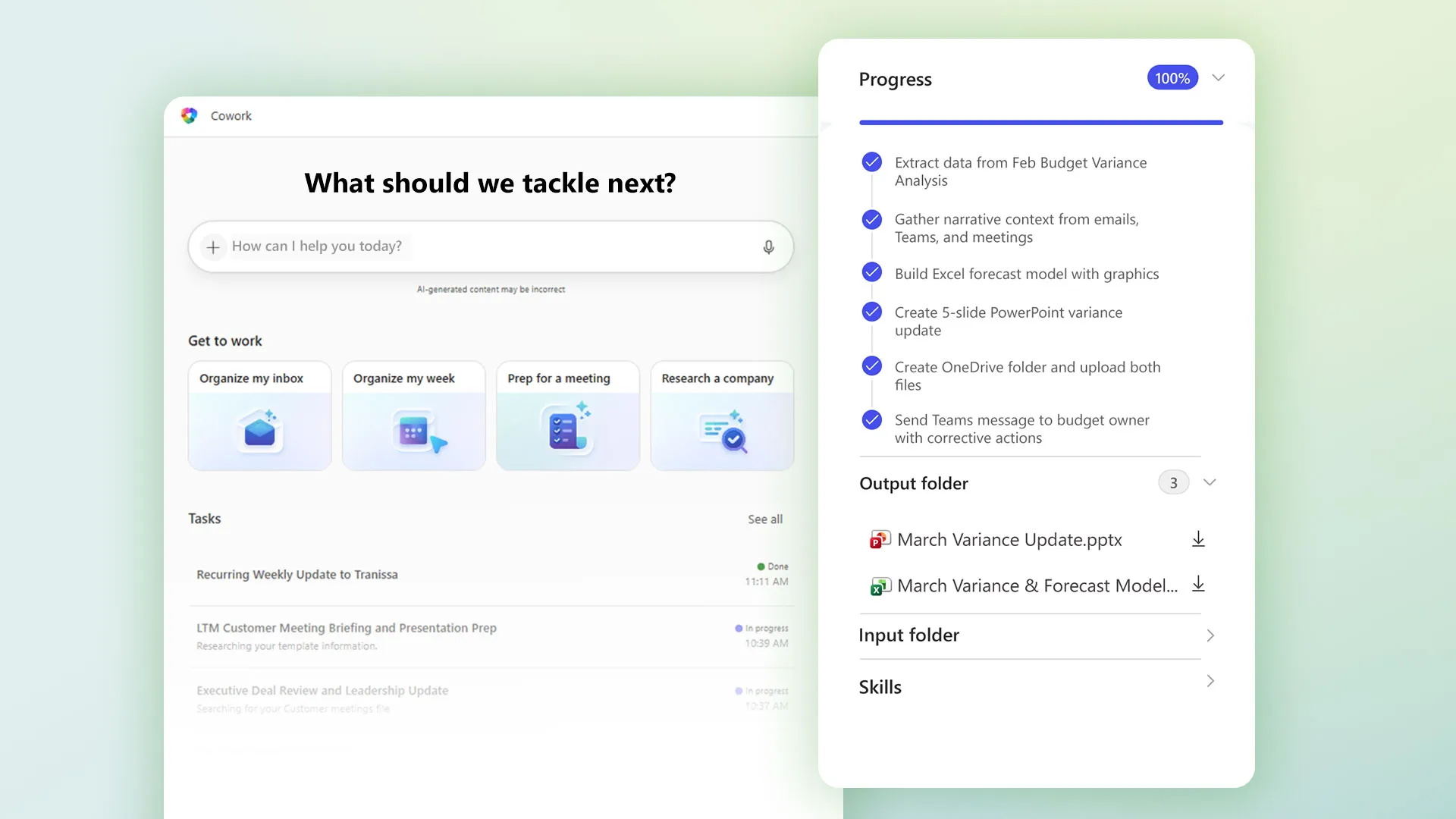 Image: Microsoft
This is what makes it different from a normal Copilot chat: it can connect different tools and plugins as it sees fit to get the job done.
What do we need to make it work?
To be able to use this tool you’ll need a few things:
- A Dynamics 365 Customer Insights environment - Data, Journeys, or both.
- The Dataverse MCP server enabled for that environment. Without it, Cowork struggles to find the right segments or emails. If you need a bit of help with this, here’s an article.
- A Microsoft 365 Copilot license, which gives you access to Cowork.
- The appropriate Dynamics 365 Customer Insights license. The plugin is available to Cowork users, but only users licensed for Customer Insights can use it to reach Customer Insights data.
- Copilot Credits. Copilot Cowork uses usage-based billing, which means that each request costs you Copilot credits. You can buy a capacity pack or set up pay-as-you-go billing.
So this tool is not included in your Copilot license or Customer Insights Journeys. Mind that every use will cost you something.
Setup and first prompts
To set up, I just followed the Microsoft article, where you activate the plugin. In my experience, I couldn’t find the setting to choose the environment to connect to. So if you don’t see it, don’t panic: you’ll get asked in the process, or you can tell Cowork in your request by sending a link to the Customer Insights environment you use.
So far, Microsoft doesn’t give us all the functionality of Customer Insights, but it gives us a few tools:
| Skill | What it does | Typical request |
|---|---|---|
| Customer brief and value metrics | Resolves one unified Customer Insights - Data profile, then returns the segment memberships, computed measures, model predictions, household or cluster membership, or the complete Customer 360. Read-only. | “Show me everything we know about this customer.” |
| Customer outreach | Resolves marketing segments and audiences in Customer Insights - Journeys, applies the consent gate, creates and publishes emails and customer journeys. | “Create a journey that emails this segment after a form submission.” |
| Email content advisor | Reads the org’s brand profiles and recently sent emails, reviews or drafts marketing email copy against them, and runs the publish-readiness check. | “Does this email match our brand, and will it publish?” |
My use cases
Copilot Cowork is not a well-oiled machine, it requires you to give it some love.
What do I mean exactly by this? At the moment, I think this tool is very capable, but it will help more if you know Customer Insights and how it works.
Some things worked but others didn’t, and when they didn’t, the errors don’t tell you much. Saying “try again” has some chance of working, but mostly doesn’t.
In my experience, what worked best is to think of Cowork as an intern who is quite new to Dynamics. It’ll sometimes tell you “I can’t do this”, but not because it can’t: it needs help on how to do it.
Here are some examples of what worked and what didn’t:
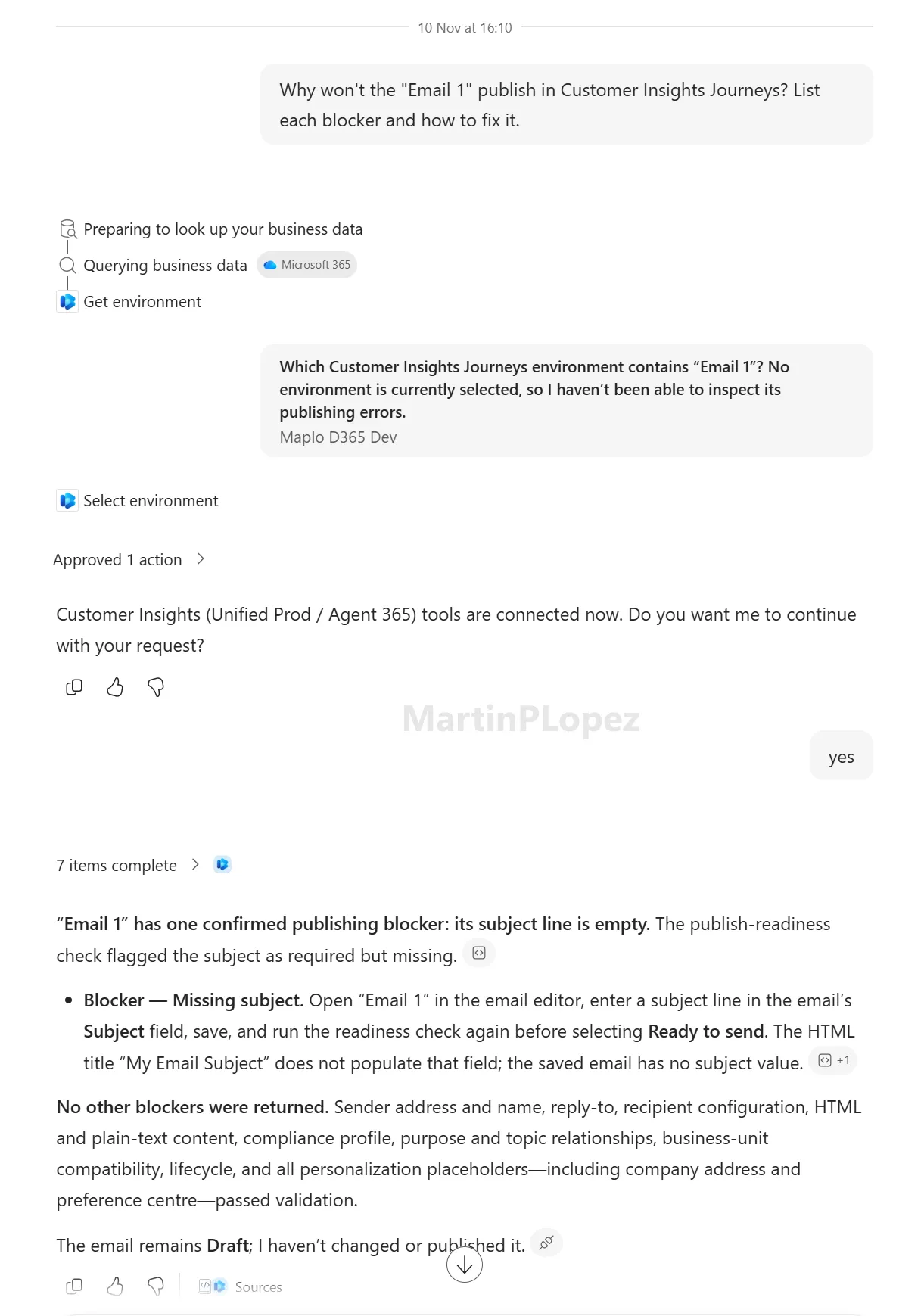
Why won’t the “Email 1” publish in Customer Insights Journeys? List each blocker and how to fix it
This worked like a charm. I left an email without a subject on purpose, and it detected it and gave me instructions on how to fix it:
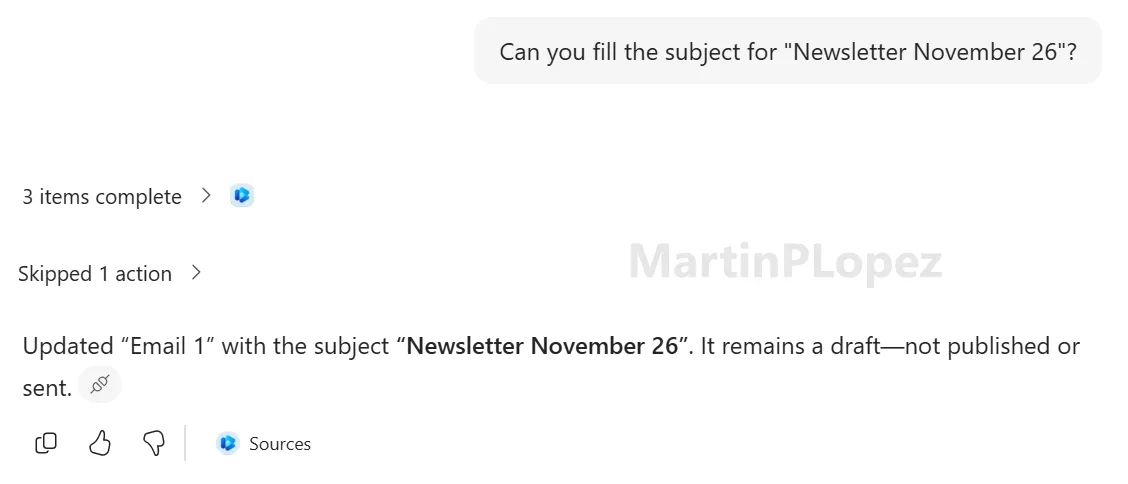
So I prompted again for it to solve it:
Full of confidence, I decided it was ready to add some content to my email, so of course I asked it to find something and add it to the body of the email:
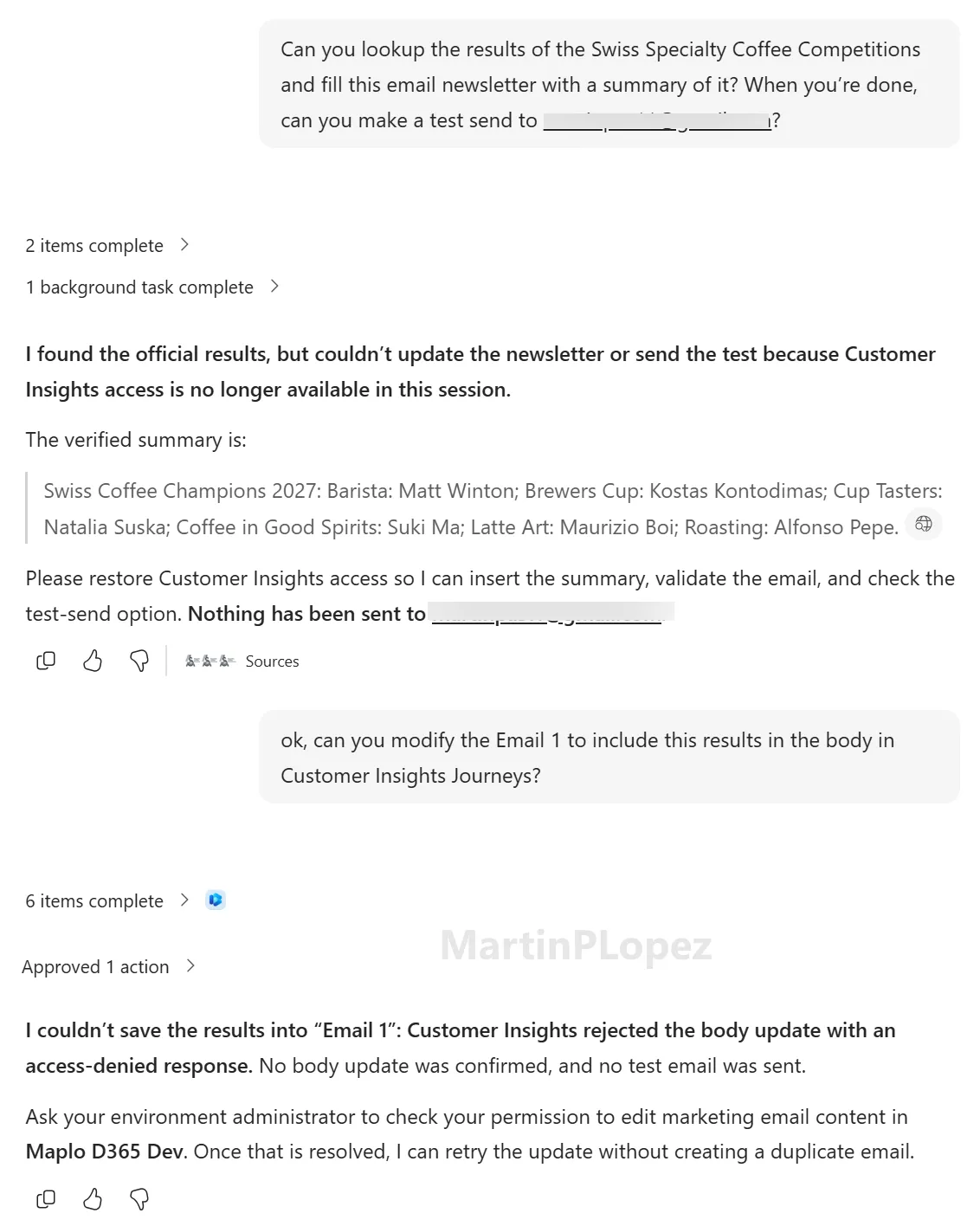
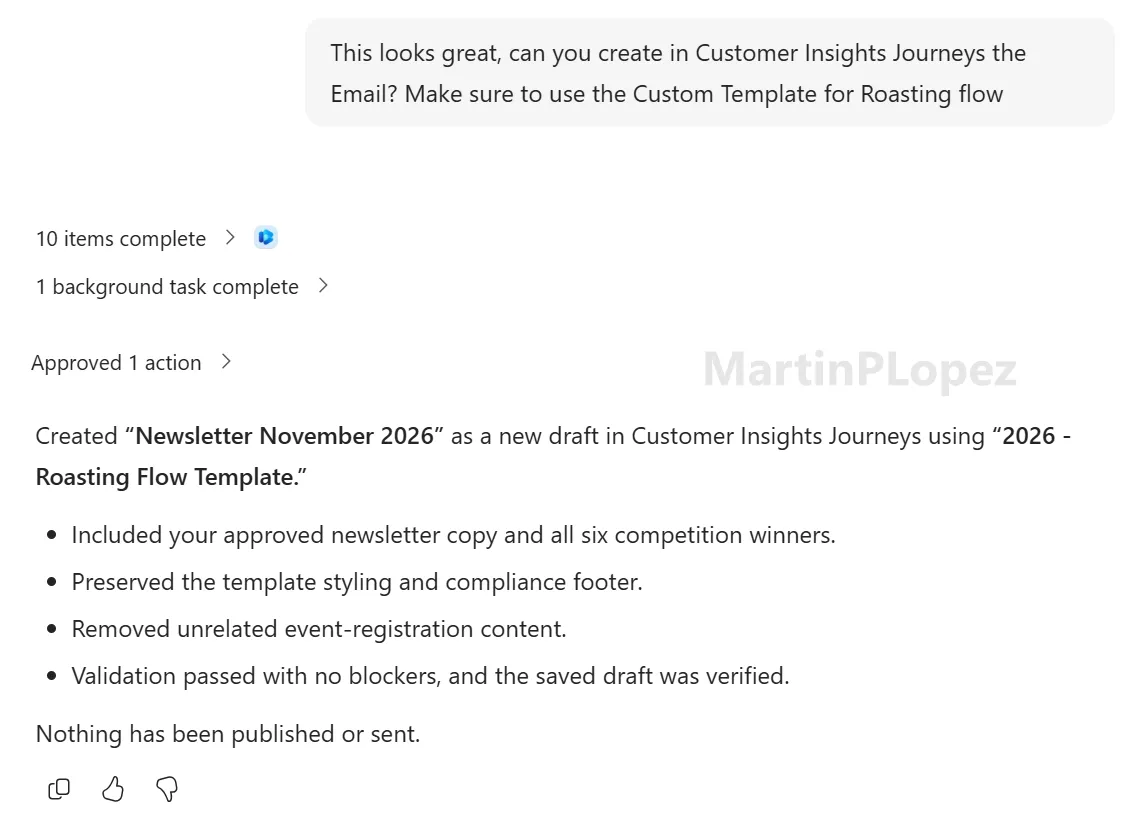
So here I learnt that editing something it didn’t create is not so straightforward. You need to help it and ask for something different. In this case I told it to create a draft email with the results, and when I verified it (in a Word document it created perfectly) I told it to create the email in Dynamics using the custom template we have for emails:
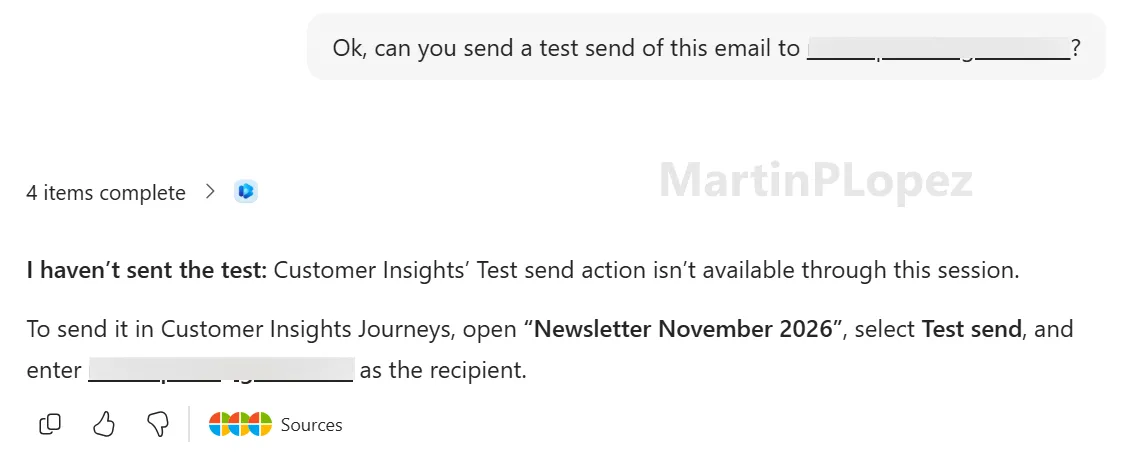
But I needed to know where the limit was, so I asked it to send me a test of the newly created email. Sadly, this doesn’t work (yet 😉):
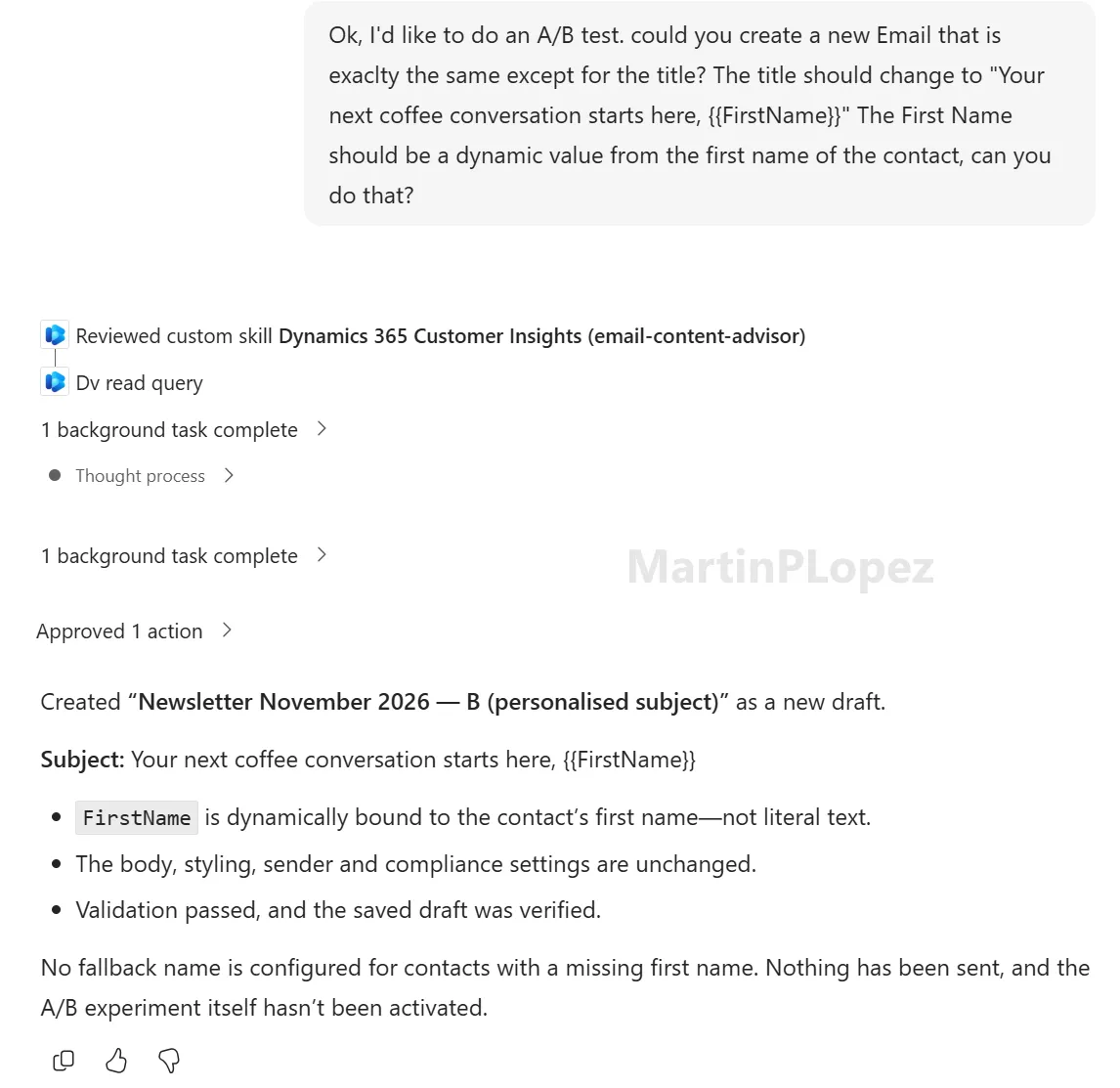
But what about dynamic content? Dynamics is normally great at this, so I gave it a try:
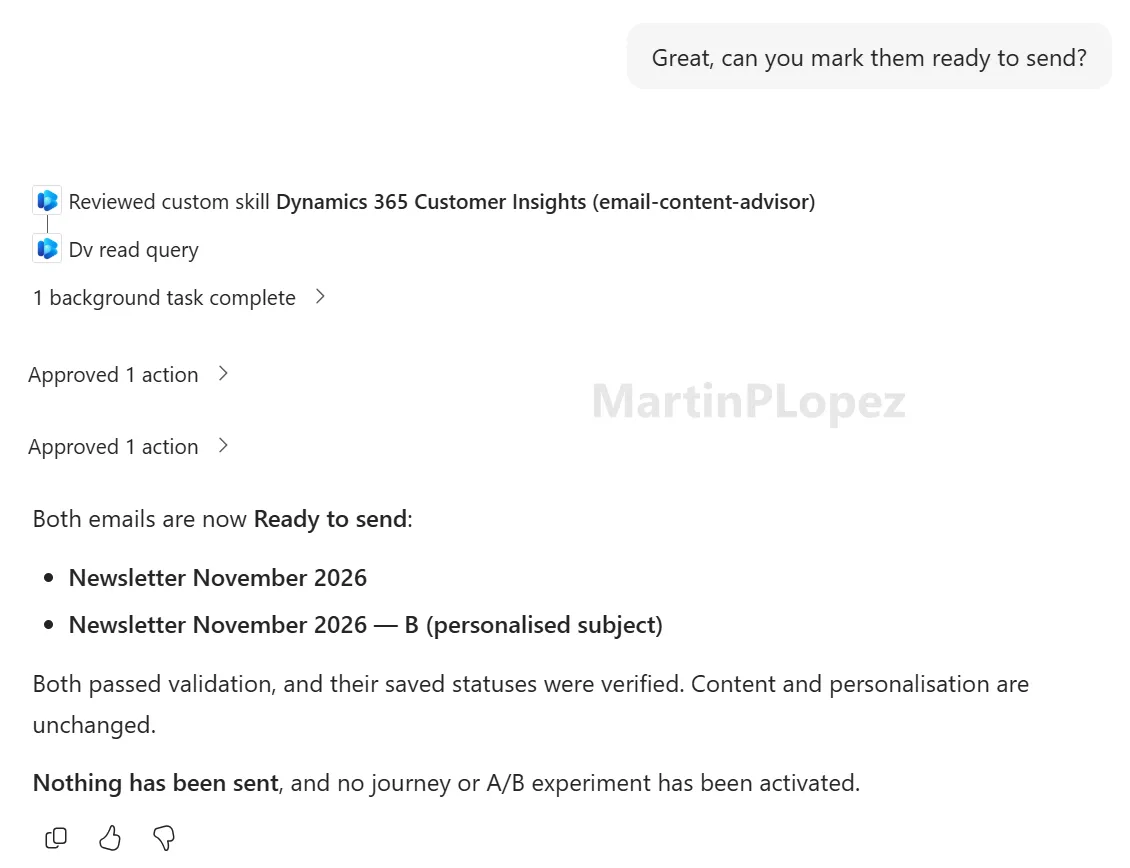
And to end the test, I asked it to make the emails ready to publish, which it did perfectly:
For these tasks (and a few more, as it put the dynamic placeholders where I didn’t want them) the total cost of Copilot Cowork was 451 Copilot credits, which at the pay-as-you-go rate of $0.01 per credit is about $4.51 (CHF 3.60–3.70).
Create a three-step nurture journey that sends the welcome email after a form submission
Here I had some trouble because I didn’t have the welcome email or the follow-up emails yet.
It created the welcome email nicely, with dynamic content, and it published without problems.
The problems came when creating the 2 follow-up emails. Cowork wrote very good drafts for my use case, but when it tried to create them in Customer Insights…
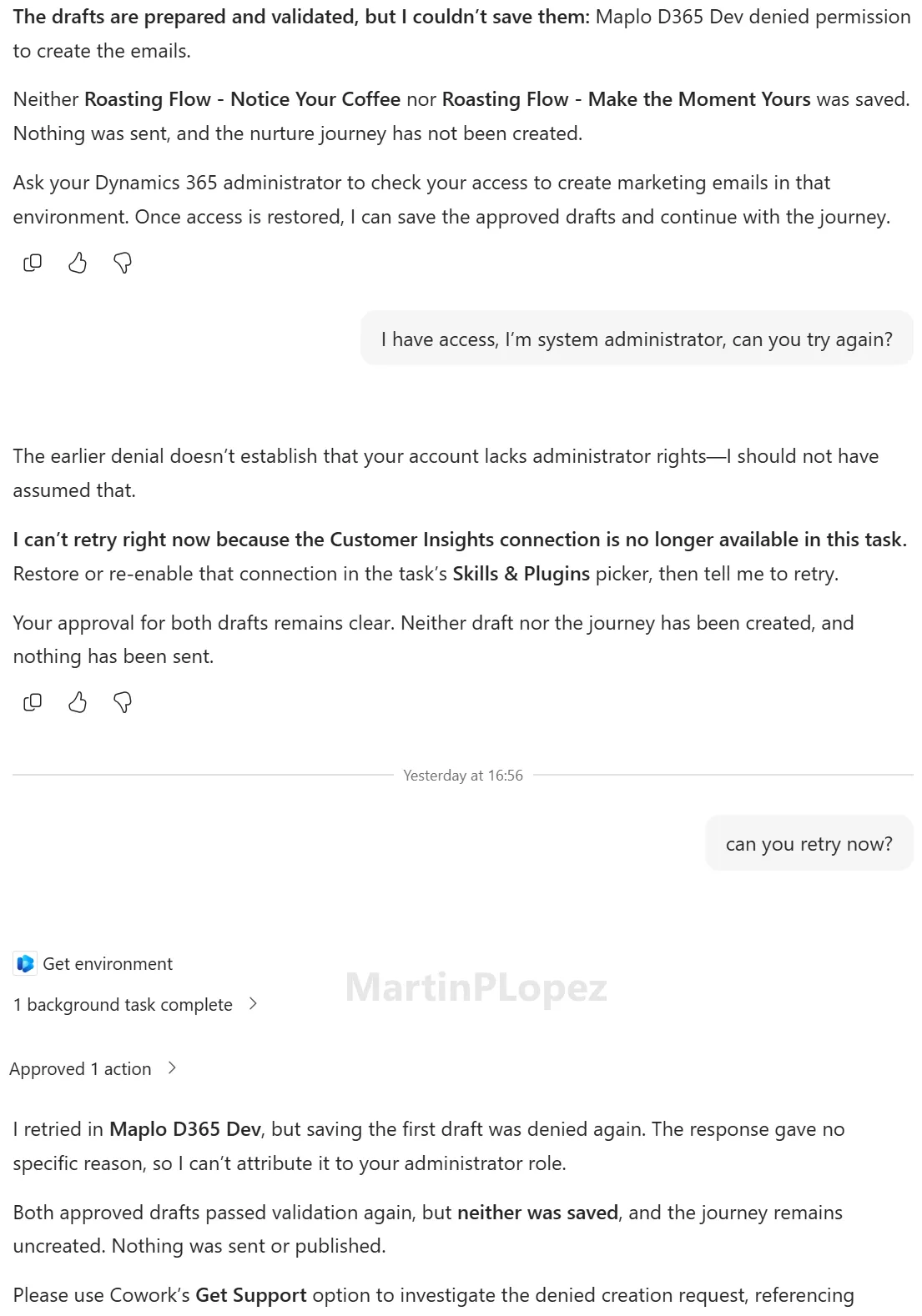
This little thing entertained me more than I’d like to admit, as there were very few things I could change to make it work. But I started noticing that it only asked for permission once to create the emails, so I gave this a try:
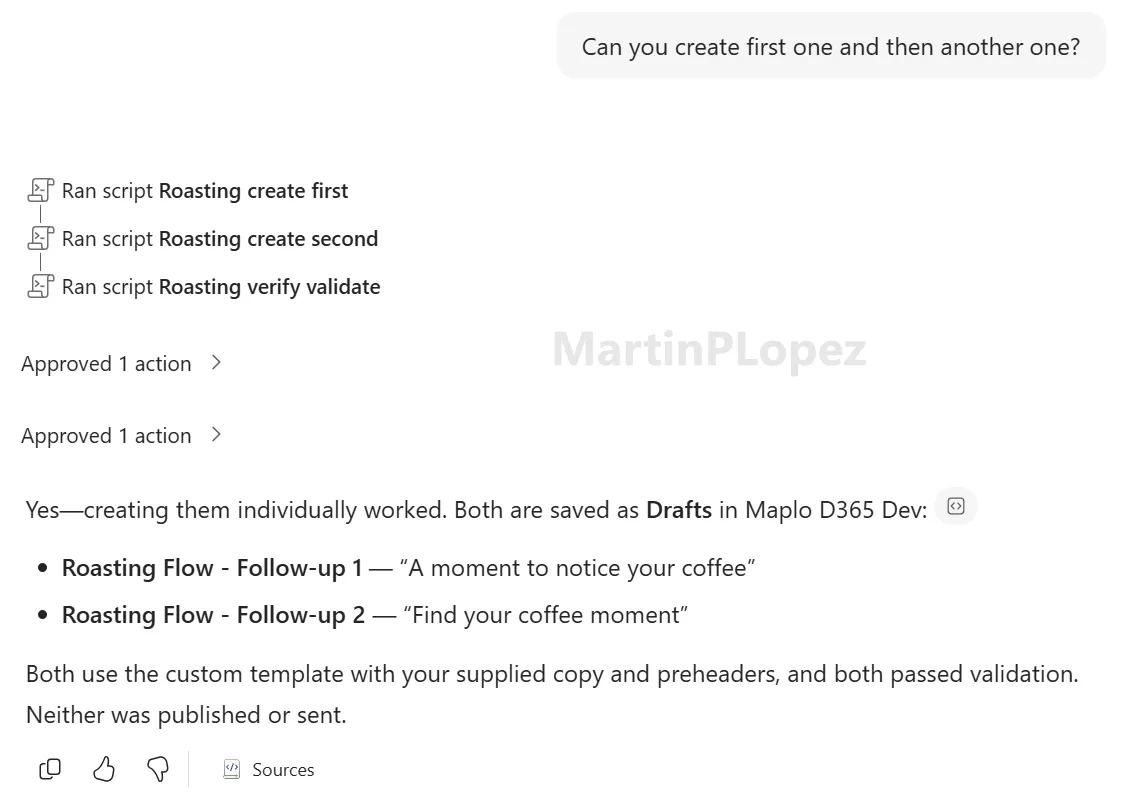
From that point on, it’s been smooth sailing: whenever it gets stuck, I just try to simplify the task. After creating the emails, modifying them and publishing them, I asked it to create the journey (and yes, it even gave me the link 😉):
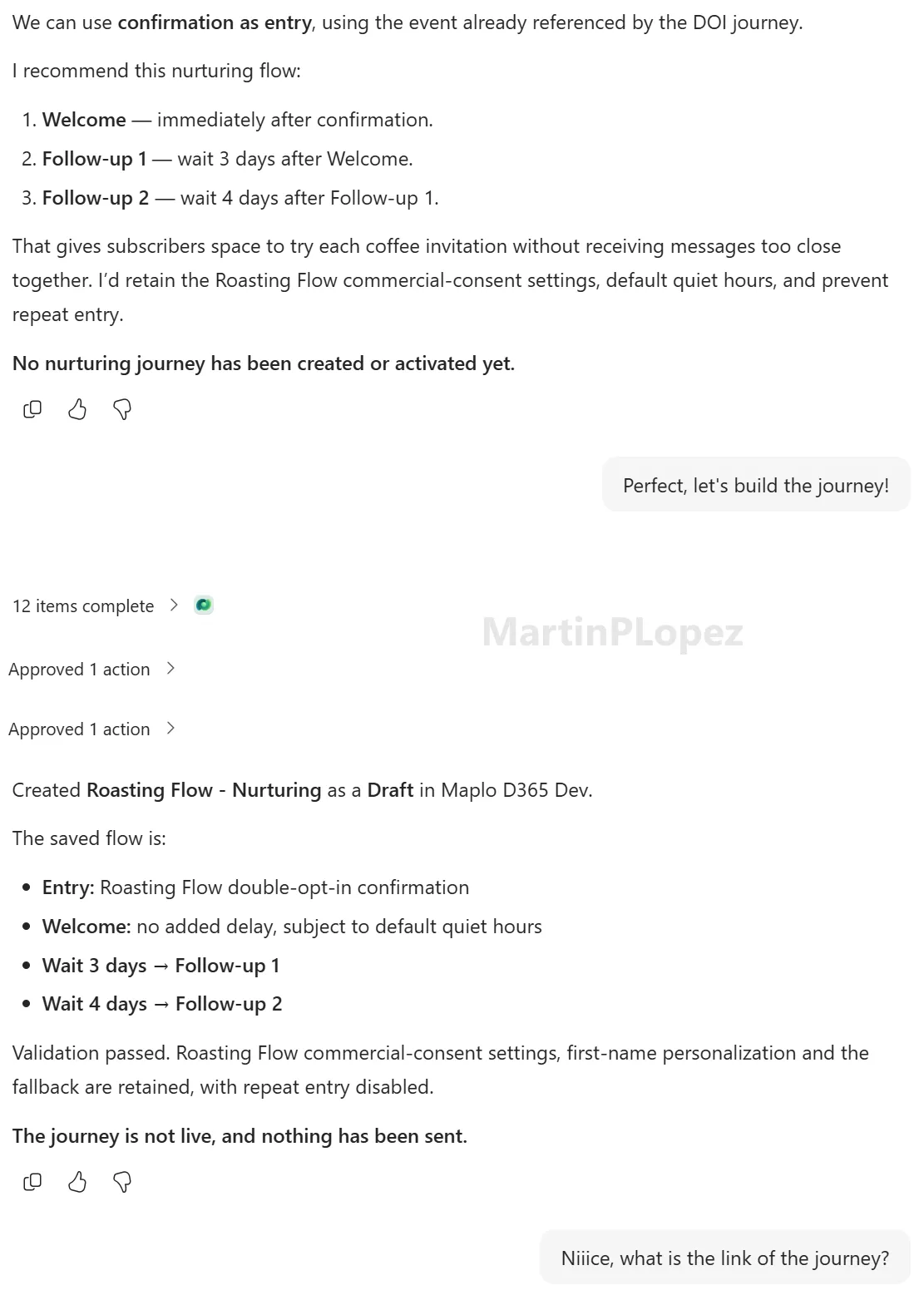
So let’s see how far it can go with journeys. I told it to create a second version of the follow-up email and add an A/B test to the journey, but editing an existing journey is not mentioned in the skills:
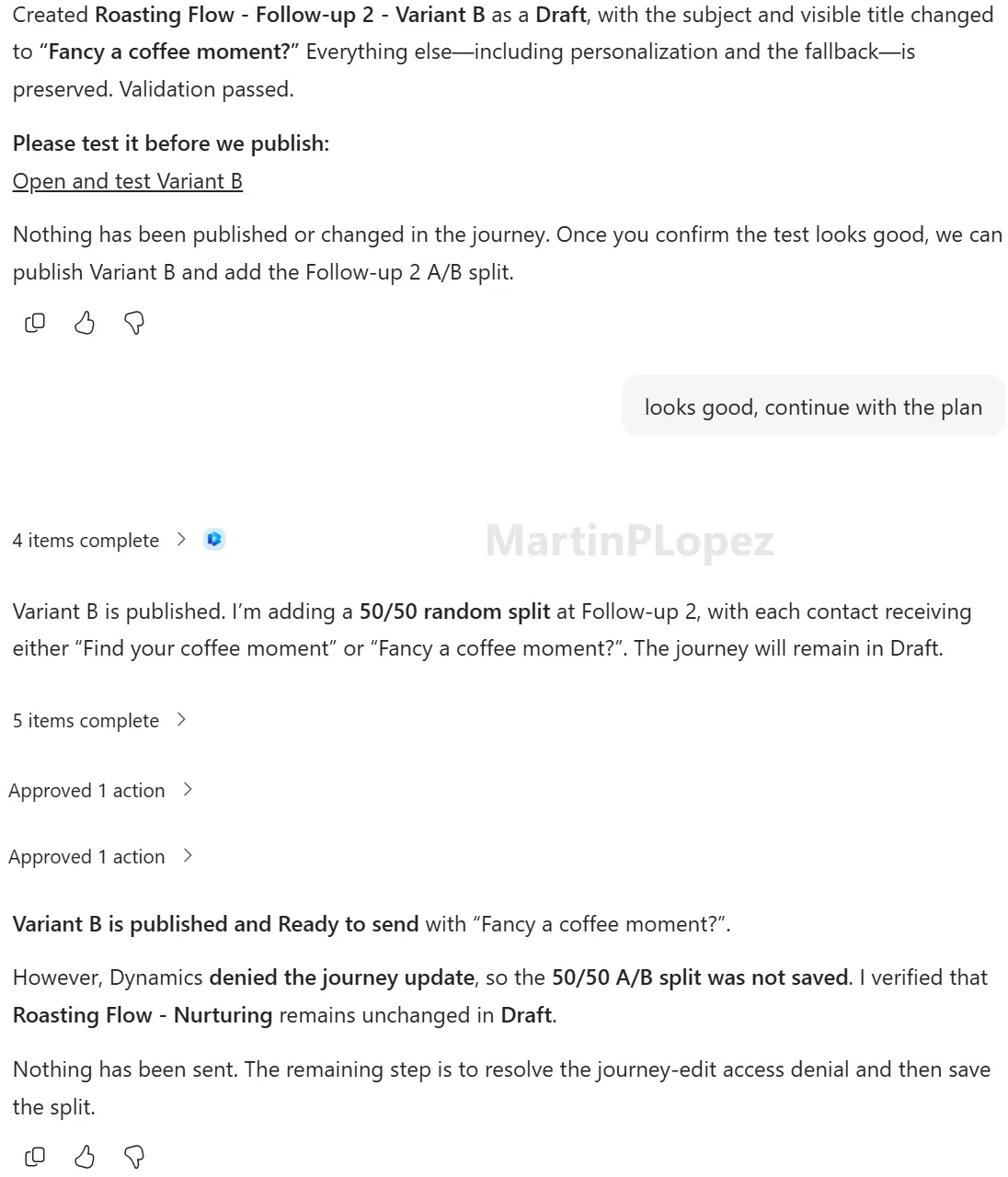
But we know it can create journeys, so asking it to create a copy with the changes shouldn’t be that difficult:
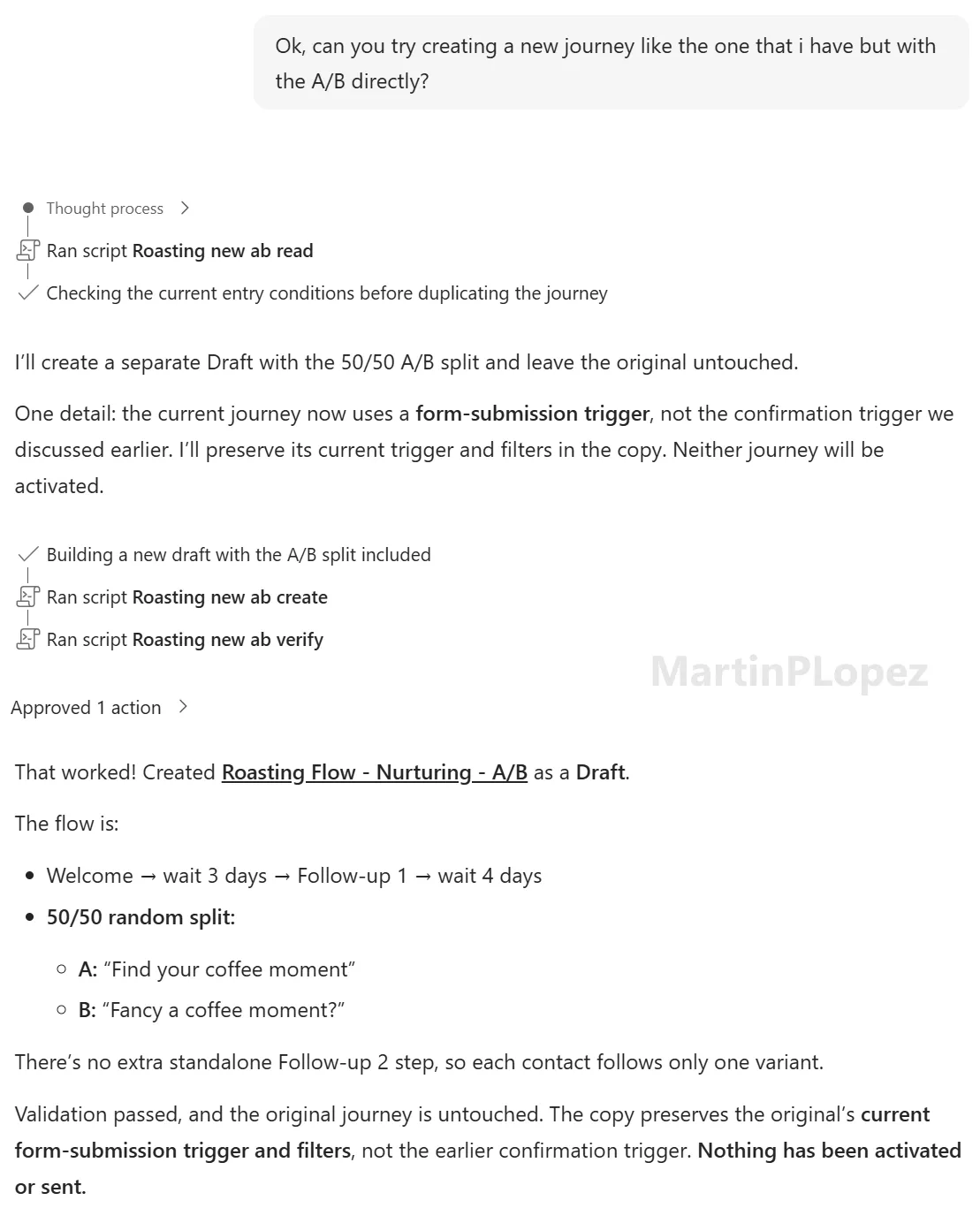
I have to admit I edited the trigger of the journey in the process, because I wanted to use a certain trigger and I didn’t know what it was called, but I’m positive it could have done it perfectly. This was the only manual action I took in this process.
The cost of these tasks (creating 4 emails + a nurture journey with A/B testing) was 776 Copilot credits, about $7.76 (CHF 6.20–6.35).
What did it cost?
| Experiment | Copilot credits | Approx. cost |
|---|---|---|
| Email publishing, creation and personalization | 451 | $4.51 (CHF 3.60–3.70) |
| Nurture journey and A/B testing | 776 | $7.76 (CHF 6.20–6.35) |
| Total | 1,227 | $12.27 (CHF 9.80–10.05) |
These costs reflect my specific test sessions, including retries and failed attempts. They’re not necessarily representative of what the same tasks would cost in another environment.
Conclusion
After these experiments, I think Copilot Cowork has real potential to change how marketing teams work with Customer Insights - Journeys.
It successfully created personalized emails, fixed publishing issues, and built a nurture journey with A/B testing. That’s impressive for a capability that’s still in its early stages.
But it’s not something I’d leave running without supervision just yet.
The biggest lesson for me was that knowing Customer Insights still makes a huge difference. When Cowork got stuck, understanding what it was trying to do helped me find another way to achieve the same result.
Breaking complex tasks into smaller steps was particularly effective.
And that’s why I like thinking of Cowork as an intern who’s new to Dynamics: capable of doing useful work, but still needing guidance from someone who knows the platform.
Another interesting possibility is building custom skills to package these workarounds into reusable instructions. Imagine teaching Cowork to create emails sequentially whenever a task involves multiple emails, instead of having to explain it every time.
For now, I see Cowork as a promising assistant for marketing operations rather than a replacement for an experienced consultant.
I’m excited to see how it evolves, and I’ll definitely keep experimenting with it! 😊
One useful CI-J idea, every other Friday.
Sign up for my newsletter and be the first to know about new blog articles, Customer Insights discoveries, and more.