Website Tracking in Customer Insights - Journeys: Triggers, Segments and Limitations
Learn how to track website visits and clicks in Customer Insights - Journeys, use them to trigger journeys and create segments, and understand the limitations before implementing it.

Meetings with Marketing Departments can sometimes open your eyes. This week I got asked if they can trigger a journey from what the customers do on their website. I knew this was possible, but how? 😐
Think about it: knowing that someone opened your newsletter is useful, but knowing that they’ve visited the same product page five times in the last week? That’s a much stronger indication of what they’re actually interested in.
So I started digging, set up website tracking, and ran a few tests of my own. Here’s what I learned along the way.
NOTE
TL;DR:
Customer Insights - Journeys can track website visits and link clicks from known contacts and leads. These interactions can be used to trigger journeys or build behavioral segments.
However, tracking requires identifying the visitor through a tracked journey link or a Customer Insights - Journeys form submission. Cookie and tracking consent are also essential considerations.
Why Track Website Interactions?
This feature, which is well documented by Microsoft, allows the marketers to create marketing automations that are personalized based on how their customers interact with their website.
But what does this mean?
Imagine we have an online clothing store and want to promote a particular t-shirt.
We could use website tracking in two different ways:
- React to a specific interaction: A customer clicks on a promotional banner. We can use that click to trigger a journey and send them more information about the product or even a discount code.
- React to repeated behavior: A customer visits the same t-shirt page five times within ten days. We can create a behavioral segment that identifies these interested customers and use it in a targeted campaign.
The first approach allows us to react to a specific action, while the second helps us identify patterns in customer behavior over time.
And the best part? We can do both directly in Customer Insights - Journeys.
How can we implement this?
To implement this, one has to add some JavaScript code in the header of your website. A similar process as when you add a Google Analytics tag to your website. In fact, if you already use Google Tag Manager on your website, this script can be configured as a new tag.
You can find the script under Settings → Customer Engagement → Web Tracking in Customer Insights - Journeys.
One thing to remember when testing: sending yourself a test email from the email designer won’t work. You need to send the email through an actual journey, click the tracked link, and then navigate through the website. After that, you should be able to see the interactions associated with your contact or lead.
⚠️ Each Customer Insights Journeys environment has a different script to link it, but if you have several websites that you wanna track, you’ll have to reuse the same script from your customer insights journeys environment.
1. Use as a trigger
The most common use case is to use the default triggers that we have available in a journey, the Marketing Website Clicked and the Marketing Website Visited:
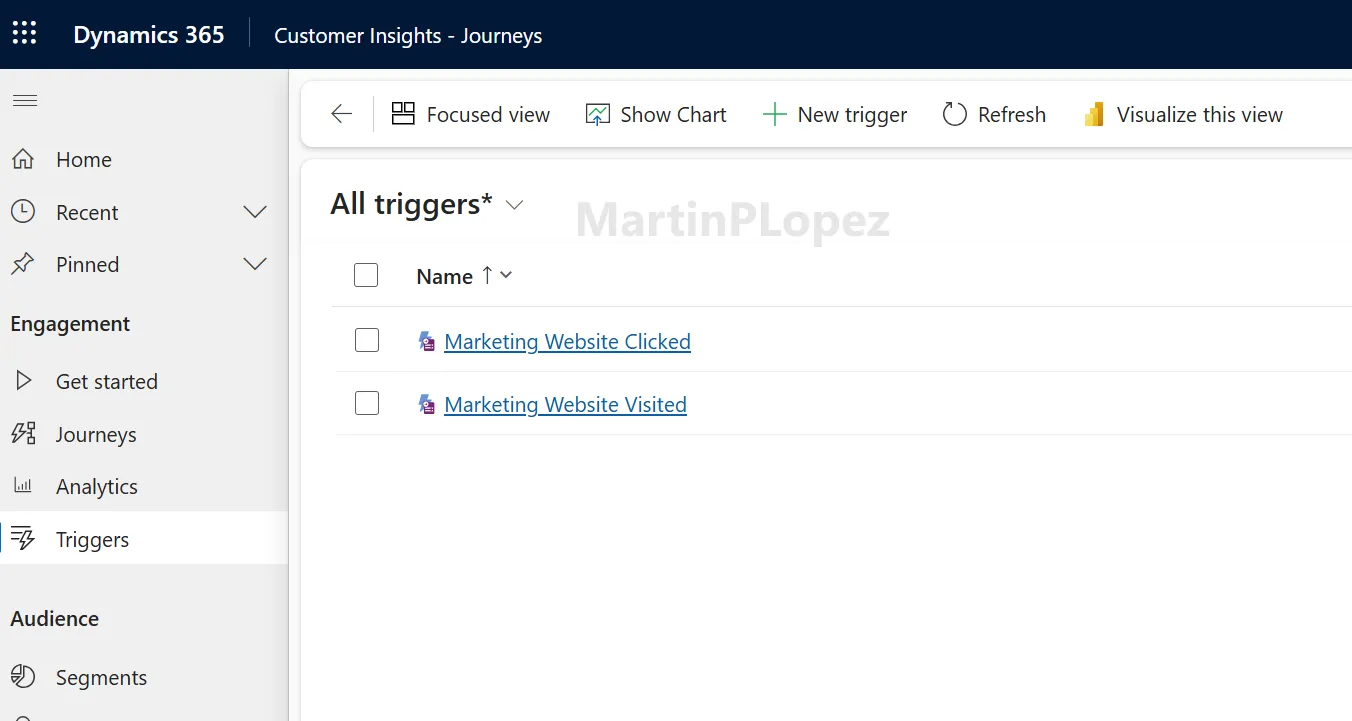
To be honest, I feel like the Marketing Website Clicked is designed more for this kind of use, as it provides you more information about the user’s behavior, some of the information that only this trigger provides:
- Action is Outbound —> The user clicked on a link that redirected outside your website
- Action Type —> The kind of interaction the user had with the website (was it a left-click or a keyboard-enter)
- Click coordinates —> Provides the position of the click on the webpage. This can be useful for identifying interactions, although coordinates may change depending on the device or website layout.
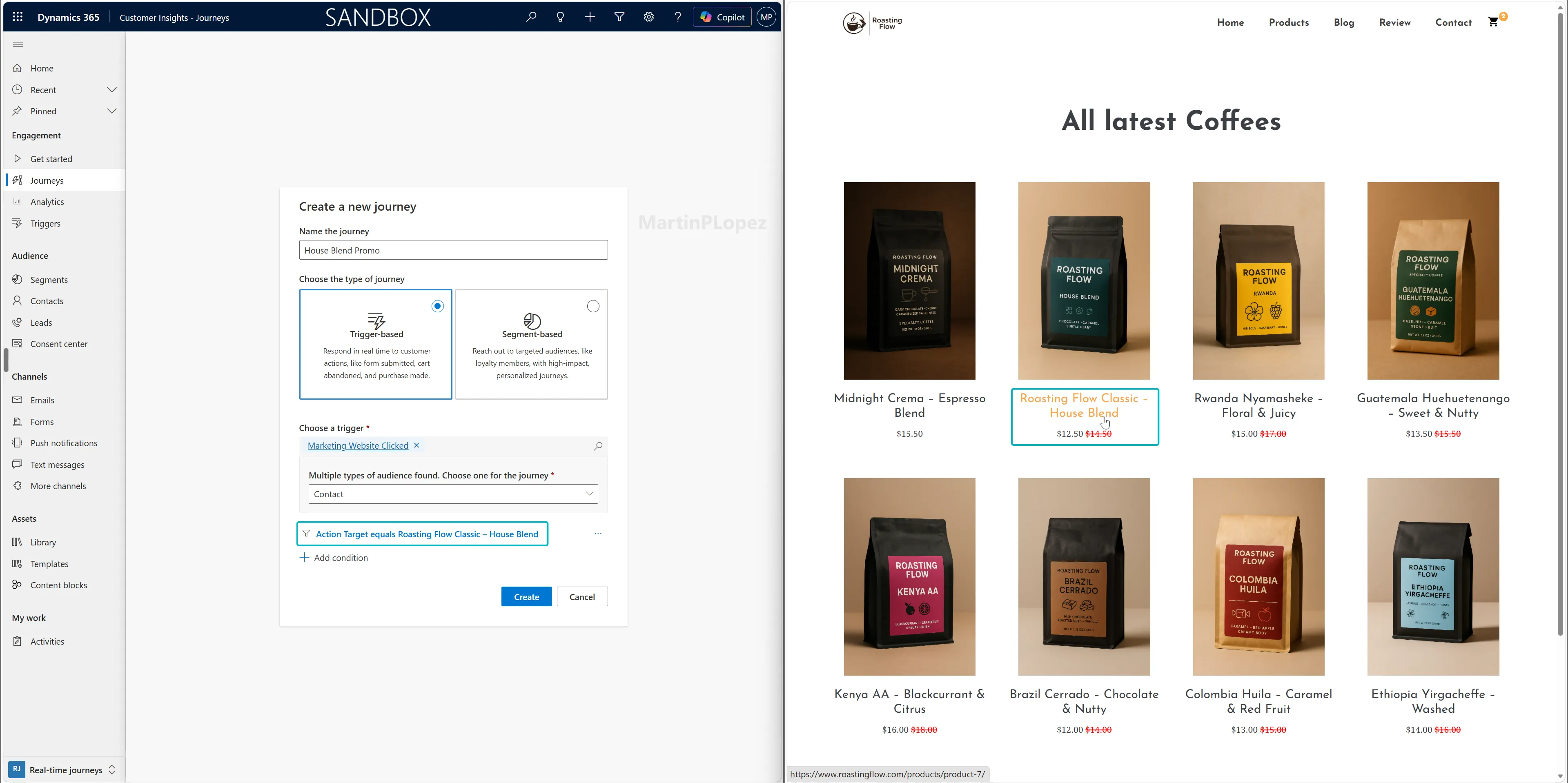
With this trigger, we can create a journey activated when a user clicks on a certain section or button. For example when you have a product that needs to be promoted, make a trigger so that everyone who clicks on the banner on the website, will get a promotion or discount on the product.
2. Use as a segment
A less obvious use case is creating behavioral segments based on website interactions.
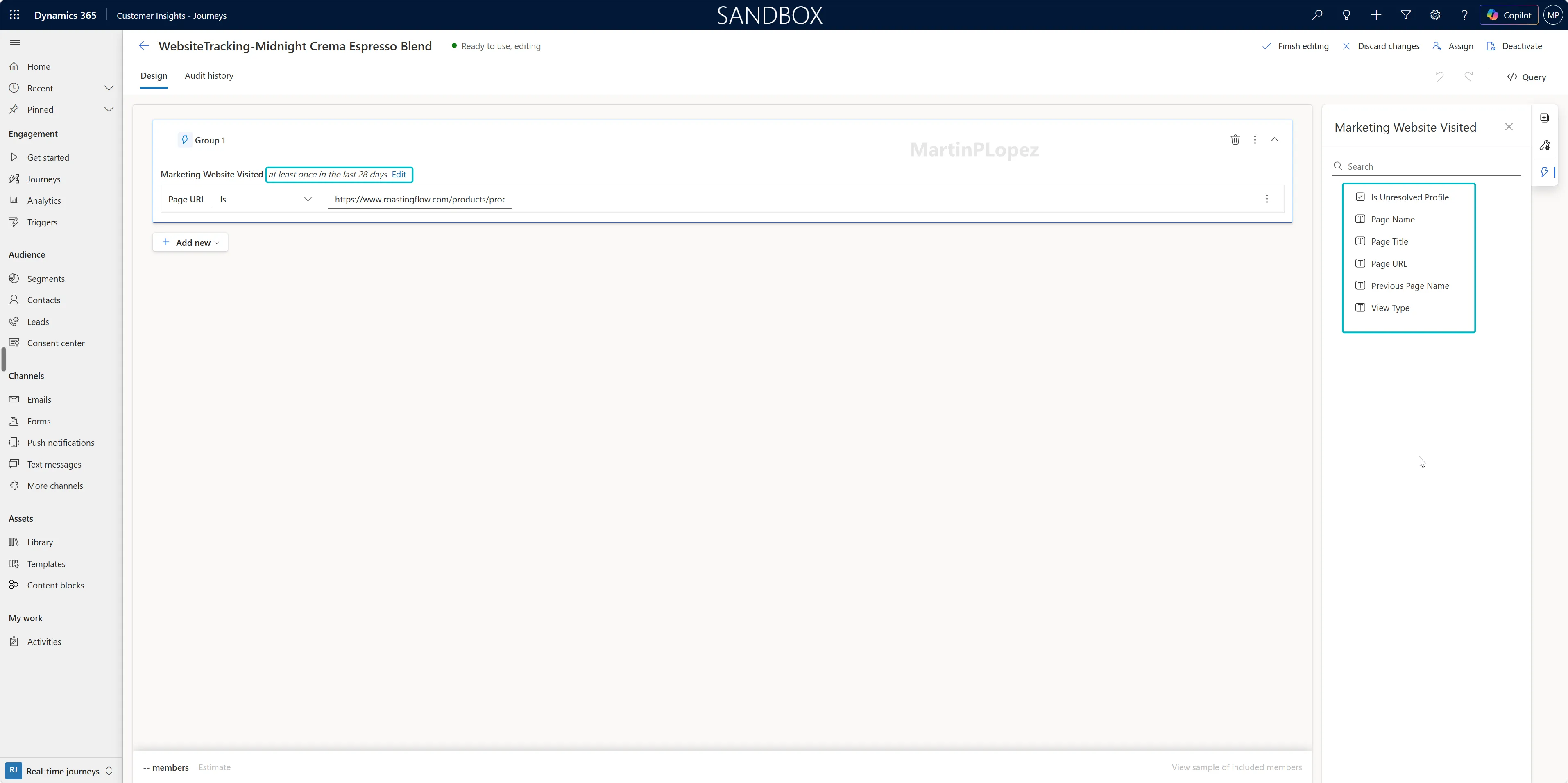
This can allow you to have more defined segments of customers interested in certain products, and launch campaigns specifically for these customers.
A case that comes to mind is if we have a segment with people that visited our events page in the last 6 months, it’s quite likely that they would be interested in the next event that we publish, so we can add this segment of “events interested people” to our invitation journey.
The other case I’ve been thinking is to detect when a customer has visited 5 times the same product page in the last 10 days, we could automatically include these customers in a nurturing journey, helping them understand the product’s benefits or encouraging them to complete their purchase.
Design considerations
There are some limitations to consider before implementing this feature:
- Not every website visitor can be tracked. Customer Insights - Journeys needs to identify the visitor before their interactions can be used in journeys or segments. This can happen when someone clicks a tracked link from a Customer Insights - Journeys email or submits a Customer Insights - Journeys form with web tracking enabled. In both cases, a cookie allows the system to recognize the visitor on future visits. However, cookies are browser-specific, so if someone visits your website from their laptop and later from their phone, the tracking won’t automatically recognize them as the same person.
- Website interactions and lead scoring are not fully integrated yet. Although website visits and clicks can be used for journeys and segments, I couldn’t use these interactions directly in the standard lead-scoring model during my tests. This would be particularly useful in B2B scenarios, where repeated visits to pricing or product pages could indicate purchasing interest.
- Prevent unintended journey runs by filtering. Website tracking can generate a lot of interactions from identified visitors, so it’s important to configure your journey triggers carefully. For example, if you want to react when someone visits a particular product page, make sure to filter the trigger by its URL. Otherwise, you might start a journey whenever someone visits any tracked page. I’d also recommend configuring how often customers can re-enter the journey, so they don’t receive the same communication every time they repeat an interaction.
- Filter Out of the default timeline, as it can get crowded quickly. As said in the previous consideration, everything that is tracked will appear in the timeline of the contact or lead, so it can get crowded quickly. My advice here is to edit the timeline in the form to remove the marketing website interactions and add them in a separate timeline, if you want to see them.
- Respect cookie consent. The website tracking script doesn’t automatically respect your website’s cookie banner. By default, Customer Insights - Journeys can set tracking cookies even when visitors haven’t accepted them. To prevent this, Microsoft provides a JavaScript function called
disableCookiesUsage()that you can integrate with your website’s cookie consent mechanism. Additionally, make sure to configure the Tracking purpose in Customer Insights - Journeys, as website cookie consent and tracking consent stored in Customer Insights are handled separately. Both need to be considered, especially if you’re operating in Europe.
Conclusion
Most Customer Insights - Journeys implementations I’ve worked on have been B2B, where website tracking doesn’t always get much attention.
However, after testing this feature, I think there’s quite a lot of potential for both B2B and B2C scenarios.
For B2C organizations, it could help create more personalized campaigns based on the products customers are interested in. For B2B organizations, repeated visits to pricing pages or specific services could be valuable indicators of interest.
Of course, there are limitations. Tracking only works with identifiable visitors, cookie consent needs to be considered, and I would love to see these interactions integrated directly into lead scoring.
Still, what I like most about this feature is that it allows us to go beyond traditional email interactions.
Instead of only reacting to what customers do with our emails, we can start reacting to what they do on our websites.
And that opens up some interesting possibilities for customer journeys.
One useful CI-J idea, every other Friday.
Sign up for my newsletter and be the first to know about new blog articles, Customer Insights discoveries, and more.